Y’SERP adds the useful URL parameters to your Google searches (result type, verbatim, period, country, language, city) and reads the results page for you: zones, ads and advertisers, ranking pages, competitors across queries, tracking over time. Free, no server, no account: nothing leaves your browser.
Coming soon on the Chrome Web Store
Chrome 109 or newer · Version 1.11.1 · Interface in French or English
Who it is for
- SEO consultants and teams: read a SERP the way Google serves it, without personalisation, in the wanted country and language; measure the room left to organic results; analyse the pages that rank; compare positions over time.
- SEA consultants and teams: inventory the ads and advertisers of a query, read the copy, the final URLs and the visible tracking, follow a client and its competitors across several queries, check the landing pages.
- Anyone who wants a neutral SERP (no AI Overview, no personalisation) in one click.
First launch
On installation, a three-step welcome page opens: pin the icon, run a Google search, reopen the popup. Without a results page open, the popup offers an « Open Google » button. From the first SERP on, the banner and the URLs under each link show up without any setting.
What the extension does, tab by tab
Tabs are named after what you look at, not after a job title: SERP (the whole page), Ads (its paid part), then Display, Search settings, Location, Tools.
SERP
Summary of the open page (query, results, visible without scrolling, column height, first organic result, paid, Google modules and organic surfaces), inferred search intent, featured snippet and AI Overview, clickable SERP zones with their share of the column in order of appearance (or by decreasing share), « People also ask » questions, related searches, videos, images, local pack, each with a Copy button. Tracking over time: save a SERP and compare it later (positions gained or lost, zones appeared or gone, advertisers in, out or moved).
Ranking pages: on request, the extension fetches the organic results’ pages (no cookies, three at a time, measurements kept 24 h) and compares their tags with what Google shows: rewritten title or not, H1, meta description, structured data, hreflang, canonical, word count excluding header and footer, presence of the query. The summary is in the popup; each page’s details are shown next to the result in the SERP.
Ads
Four figures (text ads top and bottom, Shopping ads, paid share of the column with the part visible without scrolling, first organic result pushed down), then the Advertisers and competitors table: one row per domain present in ads, Shopping or organic, your domains first with their colour, then competitors by best position; a click unfolds the domain’s ads, « + » adds a competitor to the followed domains (ten colours). For each ad: advertiser, headline, description, final URL without tracking parameters, sitelinks, extensions, visible auto-tagging and utm, query in headline, copy checks.
Landing pages: download of the ads’ final URLs (never Google click links, without tracking parameters, without cookies) to read HTTP status, redirects, message match, conversion elements (form, phone, calls to action) and tags present in the code (GTM, Google Ads, GA4, Meta, Microsoft, TikTok, LinkedIn, Hotjar, Clarity, CMP).
Competitors across SERPs: with the SEA log, every SERP you open is recorded; the table gives per domain the number of queries where it runs ads, the share at the top, best and average position, Shopping and organic presence, the queries where your client is absent while competitors are present, the brand queries under attack. TSV exports, text report, CSV log.
What the extension does not see and does not pretend to see: CPC, bids, budgets, quality score, impression share, triggering keywords. When Web mode (udm=14) is active, it reminds you that Google shows no ads in this mode.
Display
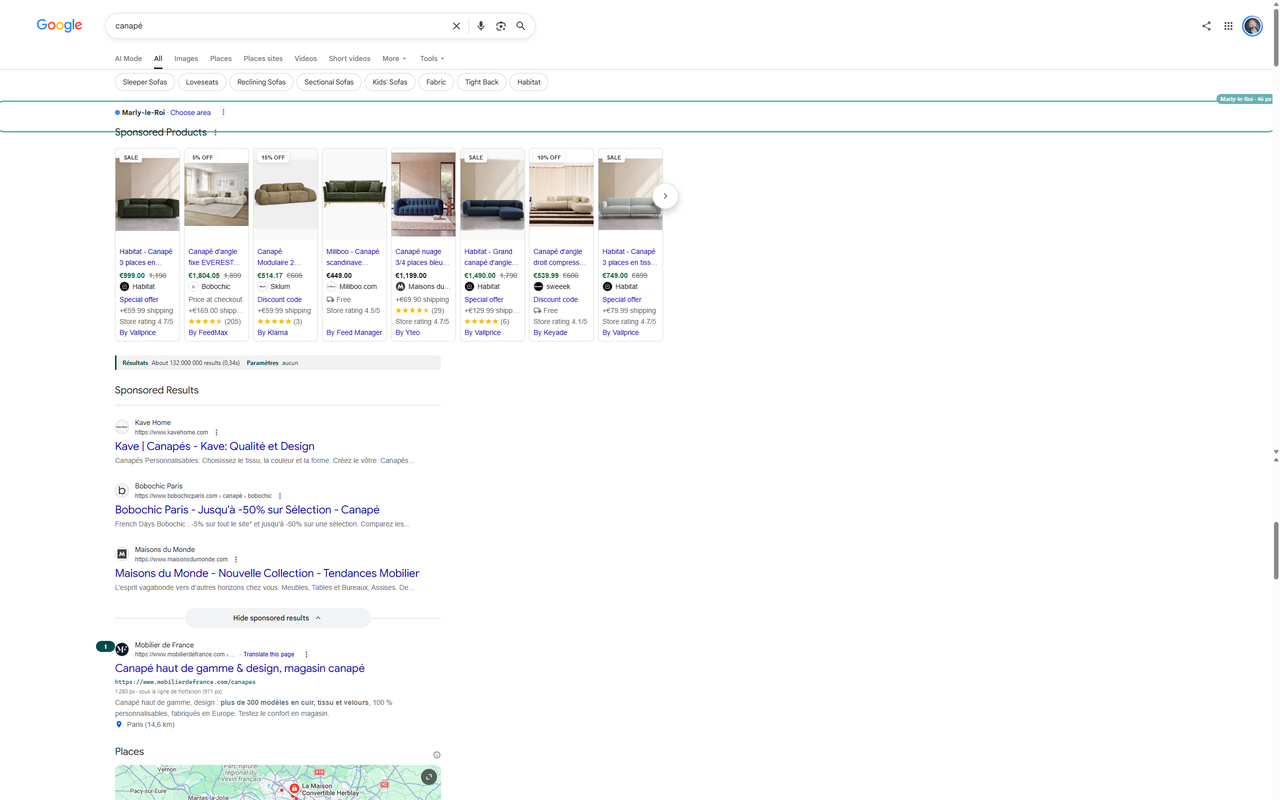
In the results page: final URL under each blue link (click to copy), banner with result count, active parameters and the ads line, position numbering, real on-screen position and fold line, result rendering (sitelinks, reviews, thumbnail, truncated title or snippet), ad details with A1, A2 badges on ads and S1, S2 on Shopping tiles, hover layer on each ad, highlighting of ten domains with their colour, zones panel that folds into a pill when it would cover Google’s right column. An audit mode turns everything on at once.
Search settings and Location
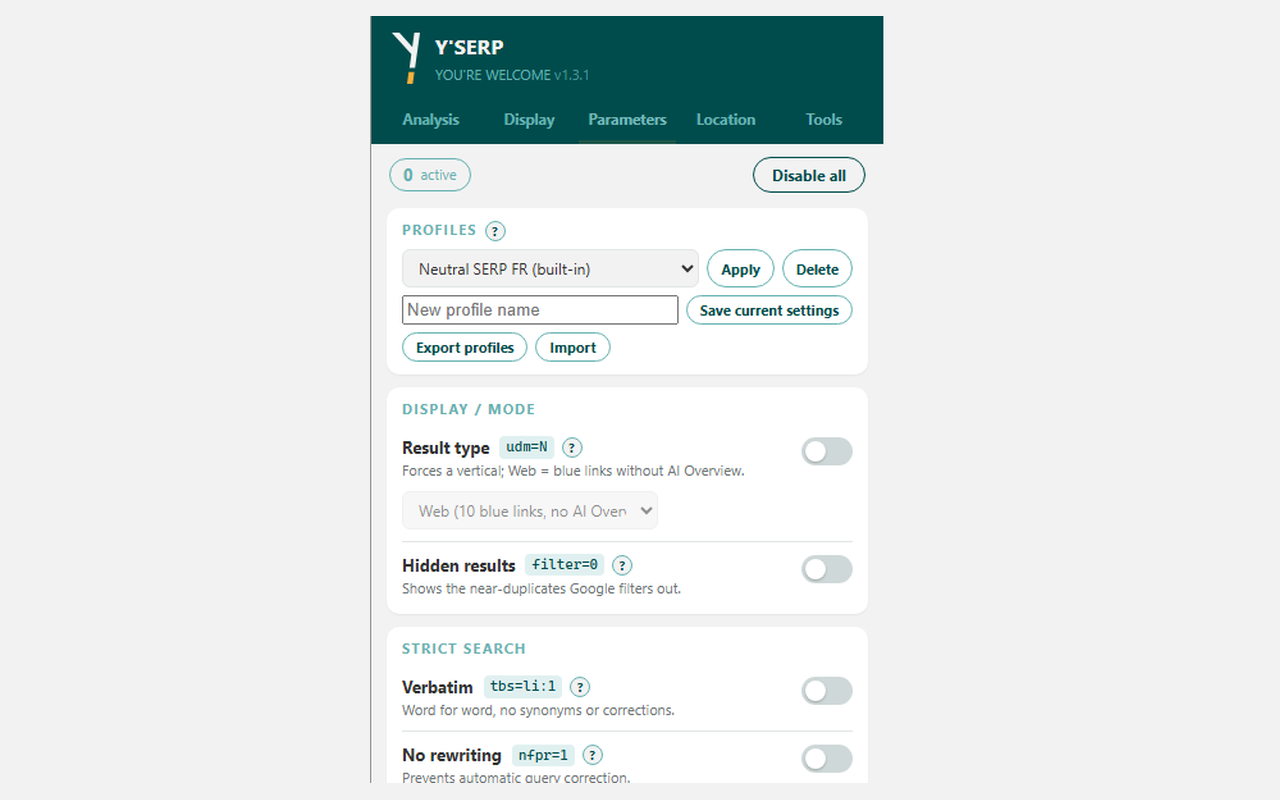
Result type (classic Web without AI Overview, images, videos, news, forums, shopping…), hidden results, verbatim, no query rewriting, rolling window or date range, SafeSearch, restriction to a site or a file type, pagination, target country, interface language, results language and country, city. Built-in profiles (neutral FR SERP without ads, US view, local audit, localised SEA audit) and custom profiles, export and import.
Tools
CSV export of one SERP or a cumulative file of several SERPs, full-page screenshot (can be cancelled), diagnostic of Google’s landmarks, language choice.
Robustness
Detection relies on the page structure (link and title) and on visible labels, not on Google’s CSS classes. Labels are observed in French and English on real SERPs; German, Spanish and Italian are covered from the usual labels of the Google interface. A diagnostic in the Tools tab lists the landmarks found or missing, and the banner warns when an update is needed. Works on the 187 national Google Search domains.
Installation
- From the Chrome Web Store: (coming soon), « Add to Chrome » button.
- The welcome page opens; pin the icon to the toolbar.
- Run a Google search: the Y’SERP banner appears above the results and the icon shows the number of active parameters.
On the first click on « Analyse the pages » or « Analyse landing pages », Chrome asks for access to the sites of the pages to analyse only; this access is only used to download those pages and can be revoked at any time.
Privacy and security
No data leaves the browser: no server, no account, no tracking, no advertising. Settings live in the extension storage (synced by Chrome when you are signed in); captures, the cumulative CSV, the analysed pages cache and the SEA log stay in local storage and can be cleared in one click. The extension is only active on Google results pages and never opens a page by itself. Page analyses only request public http(s) URLs, never a local address nor a Google click link, and CSV exports are protected against formula injection.
Full privacy policy: English · version française
Frequently asked questions
The udm=14 parameter asks Google for the « Web » view (blue links), which shows neither AI Overview nor ads: that is Google’s behaviour, the extension hides nothing and says so. To analyse ads, keep the « All » result type or the « SEA audit » profile.
The extension reads the page as rendered in your browser, with your parameters, and measures positions without counting its own annotations. For a neutral SERP, use the « Neutral SERP FR (no ads) » profile.
Not for clicks: Google click links are never followed. The landing page analysis, on your request only, downloads the final URL without advertising tracking parameters nor cookies: for the advertiser it is a direct visit, not a paid click.
Detection relies on structure and visible labels, not on CSS classes. The diagnostic reports missing landmarks and the banner warns when an update is needed.
Credits
Designed and published by Y’a pas de quoi, SEO consultancy. Not affiliated with Google. Google and Google Search are trademarks of Google LLC.